PDF Version Available
This document is also available in PDF format: whatisdata.pdf
The PDF version includes bookmarks for easy navigation and is optimized for printing.
Accessibility Notice
This document is also available in HTML format at:
Link: https://aholdengouveia.name/IntroData/labs/whatisdata.html
The HTML version provides enhanced accessibility features including keyboard navigation, screen reader support, responsive design, dark mode support, and high contrast options.
Learning Outcomes
By the end of this lab, you will be able to:
- Collect a raw data set of at least 100 records on a topic, with clear column names
- Explain the difference between data and information, using examples from your own data
- Evaluate a data source, and identify patterns, outliers, and mistakes in a data set
- Create a visualization of your data, and compare it with one made by an AI or published by someone else
Lab Instructions
Data Collection
Pick one of the following topics and collect some data about it. You can use a text editor or spreadsheet to collect your data. Think about what is good data to collect for your topic, and what your column and row names should be.
- Sports Statistics
- Weather Data
- Collectible Card Game such as Magic: The Gathering, or Vampire: The Masquerade
- Video game stats for items or characters in the game
- Collectibles such as figurines for Warhammer or D&D
You may pick another topic not listed above, but it can't be books.
Data Requirements
- At least 100 records (rows), and no more than 1000
- At least 7 labeled columns per record
- Your data can include numbers, figures, text, or any relevant data points.
- Keep it raw. Raw data should be unprocessed and unorganized. This means you shouldn't try to manipulate the data yet or do anything to it besides make sure it's in a table with labels. It's ok to have errors and duplications and other things like that at this stage.
Sample Data and Where to Find Data
A sample of book data, 100bestbooks.csv, is linked here Link: https://www.aholdengouveia.name/IntroData/labs/100bestbooks.csv
The sample data was collected from Link: https://zenodo.org/records/4265096
There are some suggestions for where you can get data sets on the Resources page Link: https://www.aholdengouveia.name/IntroData/Resources.html
Questions
- Your source
- Where did your data come from, and how did you find it? Include links to any websites you used.
- Why do you think this is a good source of data?
- Why did you decide on this type of data?
- Data and information
- Give 2 examples of raw data from your data set.
- For each example, what information can you get from it? Explain how the raw data becomes meaningful information.
- What trends or patterns can be observed?
- Are there any outliers or significant data points?
- What are at least 3 things you've noticed about your data?
- How did you decide on your column naming?
- What was the biggest challenge you had while collecting your data?
- Can you see any obvious mistakes or issues with your data? If yes, what are they?
- What do you think would be the best way to present this data to others?
- What, if anything, have you learned from collecting this data?
- If you had to collect this data again, what might you change?
Visualizations
- Your visualization
- Create at least 1 visualization of your data, as a whole or parts depending on what you think is best.
- Take a screenshot of your visualization.
- Explain why you chose what you did.
- AI visualization
- Use an AI of your choice to create a visualization of your data.
- Take a screenshot of the AI's visualization.
- Which AI did you use, and why did you pick that one?
- How does the AI's visualization compare to yours? Which one shows your data better, and why?
- If you prefer not to use an AI, do this instead of question 2: find a published visualization.
- Find a visualization that someone else has published of data similar to yours, for example on a sports statistics site, a weather service, or a game wiki. Include the link.
- Take a screenshot of the published visualization.
- Why do you think this is a good source?
- How does the published visualization compare to yours? Which one shows the data better, and why?
Screenshots
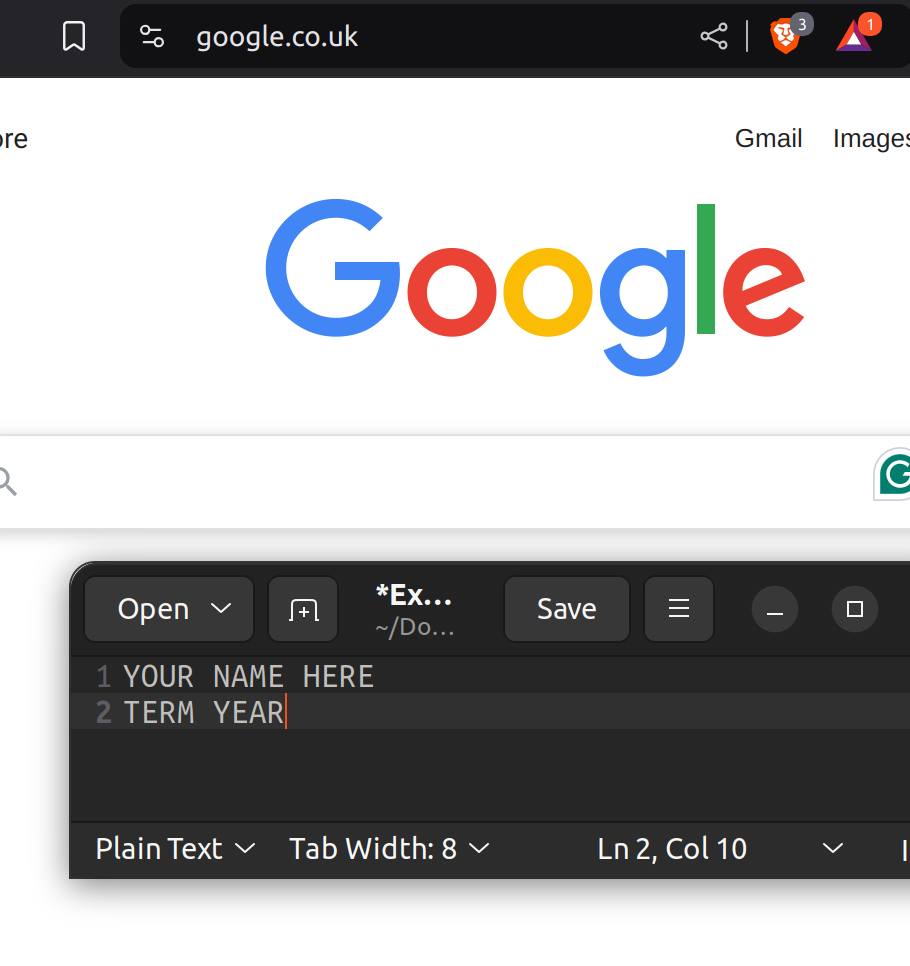
You need 3 screenshots: your data, your visualization, and either the AI's visualization (question 2) or the published visualization (question 3).
Each screenshot should have your name, term, and year. One of the easiest ways to do that is make a text document with your name and term/year on your computer and save it to use all term. Any screenshots that don't include this information won't be counted.
Deliverables
This lab should have 2 files submitted.
- Your raw data, as either a CSV or spreadsheet
- One document, clearly labeled, with:
- Your answers to the Questions, labeled with their question numbers
- Your answers to the Visualizations section
- All 3 screenshots
Resources
References, a video, a PowerPoint and some notes are available at my website Link: https://www.aholdengouveia.name/IntroData/dataforeveryone.html
Places to find data sets, on my Resources page Link: https://www.aholdengouveia.name/IntroData/Resources.html